Mastering MVVM Architecture in Android Development
 The Model-View-ViewModel (MVVM) architecture has become a popular choice among Android developers due to its separation of concerns, ease of testing, and ability to scale. By dividing your application into distinct layers, MVVM helps manage UI-related data in a lifecycle-conscious way. In this guide, we’ll dive into the fundamentals of MVVM and demonstrate how to implement it in an Android application.
What is MVVM?
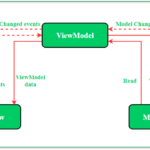
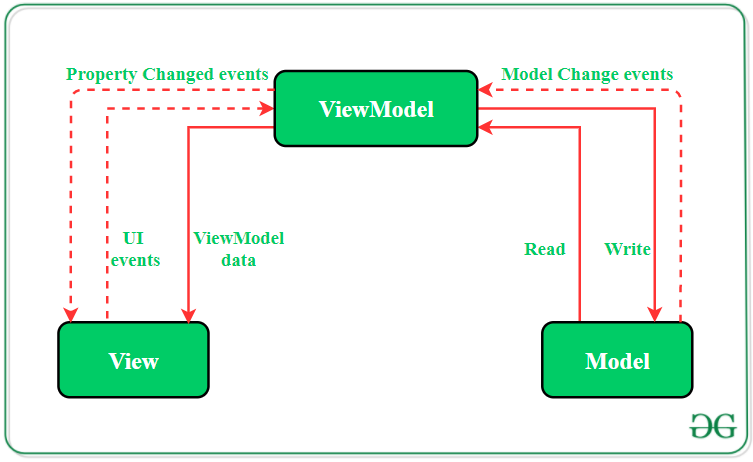
- Model: Represents the data and business logic of the application. It retrieves data from the network or local database and provides it to the ViewModel.
- View: Displays data and sends user actions to the ViewModel. Typically, it includes activities and fragments.
- ViewModel: Acts as a bridge between the Model and the View. It holds the UI-related data and handles user actions forwarded by the View.
Why MVVM?
- Separation of Concerns: Keeps the codebase modular, making it easier to manage and scale.
- Improved Testability: Facilitates unit testing by isolating the business logic in the ViewModel.
- Lifecycle Awareness: Ensures that UI-related data is managed in a lifecycle-conscious way using LiveData.
Setting Up Your Android Project
Before we start coding, make sure your project is set up with the necessary dependencies. In yourbuild.gradle file, include:
dependencies {
    implementation "androidx.lifecycle:lifecycle-extensions:2.2.0"
    implementation "androidx.lifecycle:lifecycle-viewmodel-ktx:2.3.1"
    implementation "androidx.lifecycle:lifecycle-livedata-ktx:2.3.1"
}
Example: Building a Simple MVVM App
Let’s build a simple application that fetches and displays a list of users from a remote server.- Model Layer: Create a data class and repository for fetching data.User.kt
data class User(val id: Int, val name: String, val email: String)UserRepository.kt
class UserRepository {
    fun getUsers(): List<User> {
        // Simulate fetching data from a network or database
        return listOf(
            User(1, "John Doe", "john@example.com"),
            User(2, "Jane Smith", "jane@example.com")
        )
    }
}
- ViewModel Layer: Create a ViewModel to hold and manage UI-related data.
class UserViewModel : ViewModel() {
    private val userRepository = UserRepository()
    private val _users = MutableLiveData<List<User>>()
    val users: LiveData<List<User>> get() = _users

    init {
        fetchUsers()
    }

    private fun fetchUsers() {
        _users.value = userRepository.getUsers()
    }
}
- View Layer: Create an Activity and a layout to display the data.activity_main.xml
<?xml version="1.0" encoding="utf-8"?>
<LinearLayout xmlns:android="http://schemas.android.com/apk/res/android"
    android:layout_width="match_parent"
    android:layout_height="match_parent"
    android:orientation="vertical"
    android:padding="16dp">

    <TextView
        android:id="@+id/userTextView"
        android:layout_width="match_parent"
        android:layout_height="wrap_content"
        android:textSize="16sp"
        android:text="Users will appear here" />
</LinearLayout>
MainActivity.kt
class MainActivity : AppCompatActivity() {

    private lateinit var userViewModel: UserViewModel
    private lateinit var userTextView: TextView

    override fun onCreate(savedInstanceState: Bundle?) {
        super.onCreate(savedInstanceState)
        setContentView(R.layout.activity_main)

        userTextView = findViewById(R.id.userTextView)

        userViewModel = ViewModelProvider(this).get(UserViewModel::class.java)
        userViewModel.users.observe(this, Observer { users ->
            displayUsers(users)
        })
    }

    private fun displayUsers(users: List<User>) {
        userTextView.text = users.joinToString("\n") { "${it.name} (${it.email})" }
    }
}
Explanation
- User.kt: Represents the user data model.
- UserRepository.kt: Simulates data fetching from a network or database.
- UserViewModel.kt: Contains the logic to fetch users and exposes LiveData for the view to observe.
- activity_main.xml: Defines a simple layout with a TextView to display user data.
- MainActivity.kt: Observes the LiveData from the ViewModel and updates the UI when the data changes.
Need Debugging? – Try RobotQA and Start Debugging on Real Devices. Download Plugin
Advanced MVVM Concepts
Using Retrofit for Network Requests
To fetch real data from a remote server, you can integrate Retrofit into your Model layer. build.gradledependencies {
implementation 'com.squareup.retrofit2:retrofit:2.9.0'
implementation 'com.squareup.retrofit2:converter-gson:2.9.0'
}
UserRepository.kt
import retrofit2.Retrofit
import retrofit2.converter.gson.GsonConverterFactory
import retrofit2.http.GET

interface ApiService {
    @GET("users")
    suspend fun getUsers(): List<User>
}

class UserRepository {
    private val apiService: ApiService

    init {
        val retrofit = Retrofit.Builder()
            .baseUrl("https://jsonplaceholder.typicode.com/")
            .addConverterFactory(GsonConverterFactory.create())
            .build()

        apiService = retrofit.create(ApiService::class.java)
    }

    suspend fun getUsers(): List<User> {
        return apiService.getUsers()
    }
}
UserViewModel.kt
import androidx.lifecycle.viewModelScope
import kotlinx.coroutines.launch

class UserViewModel : ViewModel() {
    private val userRepository = UserRepository()
    private val _users = MutableLiveData<List<User>>()
    val users: LiveData<List<User>> get() = _users

    init {
        fetchUsers()
    }

    private fun fetchUsers() {
        viewModelScope.launch {
            val users = userRepository.getUsers()
            _users.value = users
        }
    }
}